If you buy through a link on this page, we may earn a commission, at no extra cost to you.
Picture a corporate learning team on a Thursday afternoon. They have a 20-minute onboarding video due Friday morning, and requests for local-language versions from offices in Paris, Mumbai, and Sao Paulo. Nobody is flying in three voice actors on a day's notice.
That is the exact gap Murf AI built itself around.
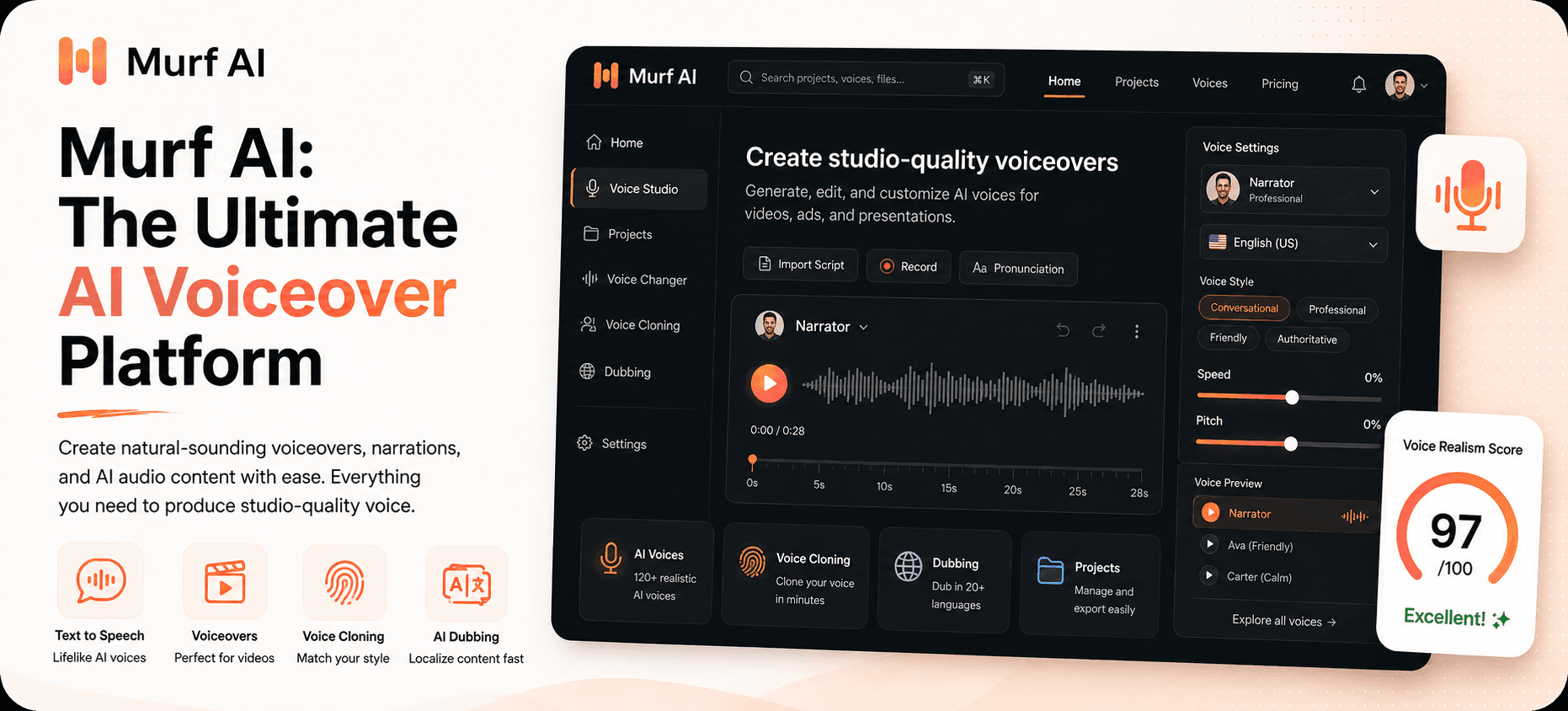
Murf AI is a text-to-speech and AI voice platform built for teams that need fast, consistent, multi-language voiceovers, plus a real-time API for building voice agents, not just a single creator who wants one good YouTube voice. It ships 200+ voices across 35+ languages, an editor that looks more like a lightweight video timeline than a "paste text, get MP3" tool, AI dubbing, gated voice cloning, and a low-latency API called Falcon for teams building phone and chat voice agents.
This review covers what actually matters if you are deciding whether to pay for it:
How good do the voices actually sound, and where do they still sound robotic?
What does Murf cost in 2026, and what is the "VGT" quota nobody explains clearly?
How does Murf compare to ElevenLabs, LOVO AI, WellSaid Labs, and Play.ht?
Who should buy it, and who should save their money?
Short answer: Murf is worth it if you produce voiceovers regularly for training, marketing, or product videos as part of a team, and it becomes very worth it if you also need real-time voice agents. It is not the cheapest way to clone your own voice, and it is not the most emotionally expressive AI voice on the market. That title still belongs to ElevenLabs, which we reviewed separately.
Quick Verdict
Metric | Detail |
|---|---|
Overall rating | 7/10 |
Best for | Teams producing regular multi-language voiceovers, e-learning, and real-time voice agents |
Main strength | Deep voice controls, 35+ languages, a genuinely fast Falcon API, and real enterprise compliance |
Main weakness | Voice cloning is locked behind Enterprise, and the usage-metering system is confusing at first |
Free plan | Yes, but no downloads and no commercial rights, 10 minutes for preview only |
Paid plans checked | Free, Creator, Business, Enterprise, plus a separate pay-as-you-go API |
Best plan for most people | Creator, billed annually, for solo creators and small teams |
Bottom line | Murf is a strong, slightly corporate voice platform, not the cheapest way to clone a voice, but one of the fastest ways to ship voiceovers at scale |
My one-line verdict: Murf is less about giving you one incredible voice and more about giving a team a repeatable voiceover production line.
What Works Well
A genuinely wide, controllable voice library. 200+ voices across 35+ languages, with real sliders for pitch, speed, pauses, and emphasis on every line, not just a single "emotion" dropdown.
Falcon, the new low-latency API. Launched in late 2025, Falcon claims 55 millisecond model latency and roughly 130 millisecond time-to-first-audio at $0.01 per minute, aimed squarely at teams building phone and chat voice agents.
AI dubbing that keeps the original tone. Murf Dub localizes existing video into 40+ languages while trying to preserve the speaker's original tone and pacing, with human linguistic review available.
Real integrations, not just an export button. Native plug-ins for Canva, PowerPoint, Google Slides, and Adobe Captivate mean marketing and L&D teams can drop AI voiceover into decks they were already building.
Enterprise trust that is actually documented. SOC 2 Type II, ISO 27001, GDPR, and HIPAA compliance, plus data residency across 11 regions, which matters if legal or procurement ever asks.
What To Watch
Voice cloning is Enterprise-only. There is no self-serve cloning tier. You contact sales, submit roughly 90 minutes of clean recordings, and wait up to four weeks. Reported enterprise pricing for cloning ranges from around $1,000 to $5,000-plus a year depending on usage, and one often-cited Reddit report claims a user paid $8,000 for a cloning setup. We could not independently verify that specific figure, so treat it as anecdotal, not confirmed pricing.
The free plan is a demo, not a tool. Ten minutes of voice generation with no downloads and no commercial rights means you cannot actually ship anything from it.
Basic voices can still sound robotic, particularly non-English accents like Hindi or Spanish on the lower-tier voice options, according to repeated user reports on G2 and Reddit.
No native video editor integration. Murf syncs voice to its own timeline well, but there is no direct plug-in for Premiere or After Effects, so heavier video editors still need to export and re-import audio.
The Studio interface has real usability complaints. A recurring theme in reviews is lag and occasional glitching when syncing longer scripts to video inside the browser editor.
What Is Murf AI?
Murf AI is a voice technology company serving what it says are 10 million-plus developers, businesses, and creators, and it lists more than 300 Forbes 2000 companies as customers, including Nestle, Air France, and Omnicom, according to Murf's own site.
The product line has grown well beyond "text-to-speech." In 2026, Murf is really five products wearing one brand:
Murf Studio, the browser-based voiceover editor most people mean when they say "Murf."
Murf Falcon, the low-latency text-to-speech API for real-time voice agents.
Murf Dub, the AI video dubbing and localization tool.
Murf Agents, production-ready conversational voice agents built on top of Falcon.
Voice Cloning, sold separately through Enterprise rather than bundled into Studio plans.
That range is Murf's biggest differentiator and its biggest source of confusion. A solo YouTuber only needs Studio. A company building an AI phone receptionist mostly cares about Falcon and Agents. Reading a generic "Murf review" without knowing which of those five products you actually need is how people end up disappointed by a plan that was never built for their use case.
Key Features
200+ voices across 35+ languages. Murf claims 99.38% pronunciation accuracy on a multilingual benchmark and an 8-out-of-10 win rate on voice naturalness in its own blind testing against competitors, figures worth treating as a starting point rather than gospel.
Fine-grained voice controls. Adjust pitch, speed, pauses, and word-level emphasis on individual lines, plus a custom pronunciation library for brand names and jargon the model keeps getting wrong.
Falcon TTS API. Roughly 55ms model latency and 130ms time-to-first-audio at $0.01 per minute, built to handle up to 10,000 concurrent calls for voice agents rather than one-off narration.
AI dubbing. Translate and re-voice existing video or audio into 40+ languages while keeping something close to the original speaker's tone.
"Say It My Way" voice cloning. Record short samples in your own voice to steer inflection and delivery, with full voice cloning gated behind Enterprise plans.
Conversational AI and voice agents. Pre-built tooling for customer service, sales, recruitment, and IT helpdesk voice bots, built on the same Falcon infrastructure.
Ready-made integrations. Direct plug-ins for Canva, PowerPoint, Google Slides, and Adobe Captivate, so voiceover work can happen inside tools teams already use daily.
How Murf Performs In Practice
Here is the part most Murf content skips: how usage is actually measured, because it changes how a plan feels once you are using it for real.
Murf meters usage in Voice Generation Time (VGT), which is based on the length of the generated audio, not the length of the text you typed. Roughly, a 1,000-word English script consumes about 6 minutes of VGT. The part that trips people up: re-rendering a block after editing the text consumes VGT again, but adjusting pitch, speed, pauses, or emphasis on already-generated audio does not. Think of it like a parking meter that only runs while your car is actually parked. Tweaking the mirrors while it sits there is free. Driving off and coming back starts the meter again.
That mechanic matters more than the headline "hours per year" number, because a script you revise ten times before it sounds right can burn through a Creator plan's annual allowance faster than the math on the pricing page suggests.
On sentiment, Murf holds a 4.7-star rating on G2 across more than 1,000 reviews, with ease of use, natural-sounding output, and voice customization as the most cited strengths. The recurring complaints line up with what we found independently: pricing feels steep for the generation limits on lower tiers, some non-English accents still sound flat, and the browser Studio can lag or stutter when you are syncing a longer script to video. A few users also report slight audio clipping at the very start of a line after a pause, which is a small but real editing annoyance if you are cutting close to picture.
None of that makes Murf bad. It makes Murf a tool you should budget and test with your actual script, in your actual language, before committing to an annual plan.
Murf AI Pricing in 2026
Murf runs Studio subscriptions and API usage on two separate pricing tracks. Verified against Murf's official pricing and cross-checked against independent trackers as of this writing:
Plan | Price | What You Get |
|---|---|---|
Free | $0/month | 10 minutes of voice generation, no downloads, no commercial rights, testing only |
Creator | $29/month, or $19/month billed annually | 24 hours of VGT per year, 1 seat, full commercial rights |
Business | $99/month, or $66/month billed annually | Roughly 96 hours of VGT per year on the annual plan, 1 editor seat, priority support |
Enterprise | Custom pricing | Unlimited VGT, voice cloning, SOC 2 Type II and ISO 27001 compliance, dedicated account manager |
Falcon API | $0.01 per minute | Pay-as-you-go, separate from Studio, for real-time voice agents |
Standard TTS API | $0.03 per 1,000 characters | Pay-as-you-go, separate from Studio, for developers embedding voice in a product |
Annual billing saves roughly a third over paying monthly on both Creator and Business, which is worth doing the moment you know you will use Murf past a single project.
Is it worth the price? For a solo creator publishing one video a week, the Creator plan at $19/month annually is reasonable and cheaper than hiring a voice actor for anything short-form. For a team producing training or marketing content across languages, Business or Enterprise starts to pay for itself in hours saved, particularly once dubbing and Canva/Slides integration enter the picture. If your only goal is cloning your own voice cheaply, Murf is the wrong tool. That feature sits behind an Enterprise sales conversation here, not a $20 add-on.
Murf AI vs Competitors
Tool | Best For | Starting Price | Key Differentiator |
|---|---|---|---|
Murf AI | Team voiceover production, dubbing, and real-time voice agents | $19/month (Creator, annual) | Falcon API latency, enterprise compliance, and native Canva/Slides/PowerPoint integration |
ElevenLabs | Creators, podcasters, and audiobook-style narration | $6/month (Starter) | The most natural-sounding voice cloning and emotional range on the market |
LOVO AI | Budget video voiceovers with a built-in video editor | $24/month (Basic) | Cheaper entry point bundled with a simple video timeline |
WellSaid Labs | Brand-safe corporate and marketing voice models | Around $55/month (Creative) | Curated, consistent "brand voice" models built for repeat marketing use |
Play.ht | Developers who want a straightforward TTS API | $31/month | Simple, developer-friendly API pricing without Murf's Studio-vs-API split |
ElevenLabs is the one worth thinking hardest about, since we cover it in detail in our ElevenLabs review. It generally wins on natural cadence, emotional nuance, and self-serve voice cloning that starts at its Creator tier rather than requiring an Enterprise contract. Murf tends to win when the job is corporate narration at volume, multi-language dubbing, or building a voice agent on a latency-sensitive API, work where consistency across hundreds of lines matters more than expressive range on any single one.
LOVO AI undercuts Murf on price and bundles a basic video editor, which suits creators who want one tool for both voice and simple cuts, but its voice bench is smaller and less consistent at the top end.
WellSaid Labs leans hard into "brand voice" consistency for marketing teams and charges accordingly, without Murf's dubbing or voice-agent tooling.
Play.ht is the simplest pure-API option if you are a developer who just wants text in and audio out without Murf's separate Studio subscription layer.
If AI-generated video is also on your list, our HeyGen review covers how a script-to-avatar-video workflow compares to a voice-only tool like Murf.
Who Murf AI Is Best For
Murf makes the most sense if you are:
A marketing or L&D team producing training, onboarding, or product videos regularly, especially across more than one language.
A YouTuber, course creator, or agency that wants voiceover synced to a timeline rather than a raw audio file to edit separately.
A developer or product team building a voice agent, where Falcon's latency and pricing matter more than a single polished narration.
An organization that needs SOC 2, ISO 27001, GDPR, or HIPAA documentation before procurement will even consider a vendor.
Who Should Skip It
Anyone who mainly wants to clone their own voice affordably. ElevenLabs' self-serve cloning is cheaper and faster to access than Murf's Enterprise-only route.
Podcasters or audiobook creators chasing the most emotionally expressive, human-sounding narration for long-form audio, where ElevenLabs still has the edge.
Anyone who only needs a handful of voiceovers a year. The free plan cannot ship anything commercially, so an occasional user is paying for capacity they will not use.
Teams already deep in Adobe Premiere or After Effects workflows expecting a native plug-in, since Murf does not offer one.
Final Verdict: Is Murf AI Worth It?
Murf AI earns its place as one of the more credible AI voice platforms for teams in 2026, not because it has the single best-sounding voice on the market, but because it is built for the unglamorous, repeatable work of producing voiceovers at scale, in multiple languages, inside the tools a team already uses.
If your work looks like training videos, product explainers, e-learning modules, or a voice agent that needs to respond in under 200 milliseconds, Murf is a genuinely strong pick, and the Creator plan is a low-risk way to find out. If your work looks like a podcast, an audiobook, or cloning your own voice on a budget, you will likely be happier, and pay less, with ElevenLabs instead.
Either way, test it with your own script and your own language before committing to an annual plan. That ten-minute free tier will not tell you everything, but it will tell you if the voice you would actually use sounds right to your own ear, which no review, including this one, can fully do for you.
Ready to try it? Start with Murf AI's free plan and see how the Creator tier handles your next script before you commit to a year.
Curious to see how it performs?
Try
MurfAI
Now
GOT ANY QUESTIONS LEFT?
Is Murf AI free to use?
Is Murf AI good for YouTube voiceovers?
How much does Murf AI cost?
Is Murf AI better than ElevenLabs?


