Guide
Heygen Review 2026: The AI Video Tool That's Making Cameras, Crews and Video Editors Nervous
1. The Camera Tax Nobody Talks About
Here's an uncomfortable number. A single professionally produced video — studio booking, on-camera talent, editing, colour grading — costs somewhere between ₹20,000 and ₹80,000. Per video. Before you've written a single word of script.
Yet every piece of data from the last three years says the same thing: video is the highest-converting content format on the internet. Audiences watch it. Algorithms love it. Affiliate links buried inside a YouTube description earn 3–5x more clicks than those buried at the bottom of a blog post.
So creators face a quiet tax. Make videos and spend a fortune, or skip video and leave the biggest distribution channel on the table. Most choose the latter, and wonder why their written content isn't converting.
10M+Users across 150+ countries
175+Languages with lip-sync translation
700+AI avatars across genders & ethnicities
80%Reduction in video production cost
HeyGen removes the tax. You write a script. You pick an AI avatar. Three minutes later you have a polished, studio-quality video. No camera. No editor. No studio booking. That's not a feature — it's a business model shift for anyone building a content-led brand.
"AI avatars can reduce video production expenses by up to 80% while maintaining professional quality — a genuine game-changer for small teams and solo creators."— MarketsandMarkets Research, 2025
2. So What Actually Is HeyGen?
Think of HeyGen as a video production studio that lives inside your browser. You write, it films. No camera nerves. No bad lighting. No editor sending you revision requests at 11pm.
Founded in 2020 by Joshua Xu and Wayne Liang (originally launched as Movio), HeyGen creates professional videos using AI-generated avatars that read your script, in your chosen language, with lip-sync accurate enough to make dubbing artists genuinely uncomfortable about their career trajectory.
Today it serves over 10 million users across 150+ countries — from solo YouTubers who hate being on camera to enterprise L&D teams producing onboarding videos in 12 languages simultaneously. It's not a niche tool anymore. It's becoming standard kit for serious content operations.
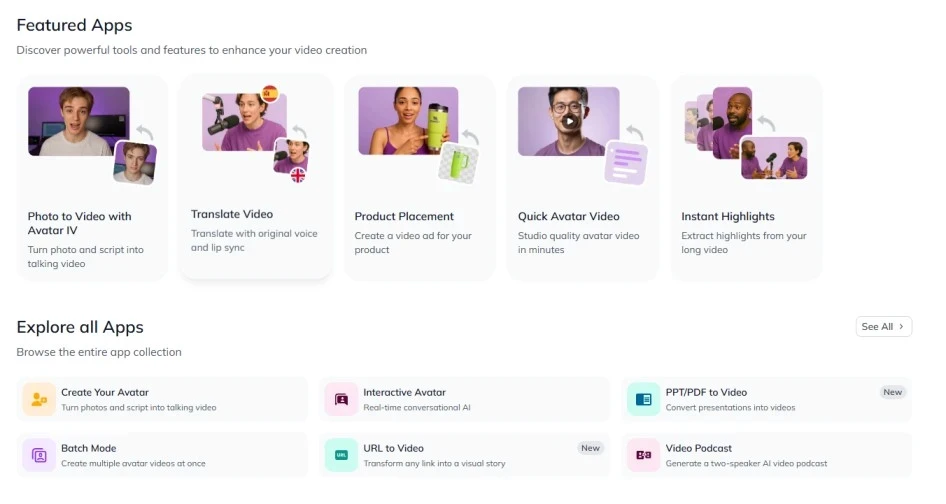
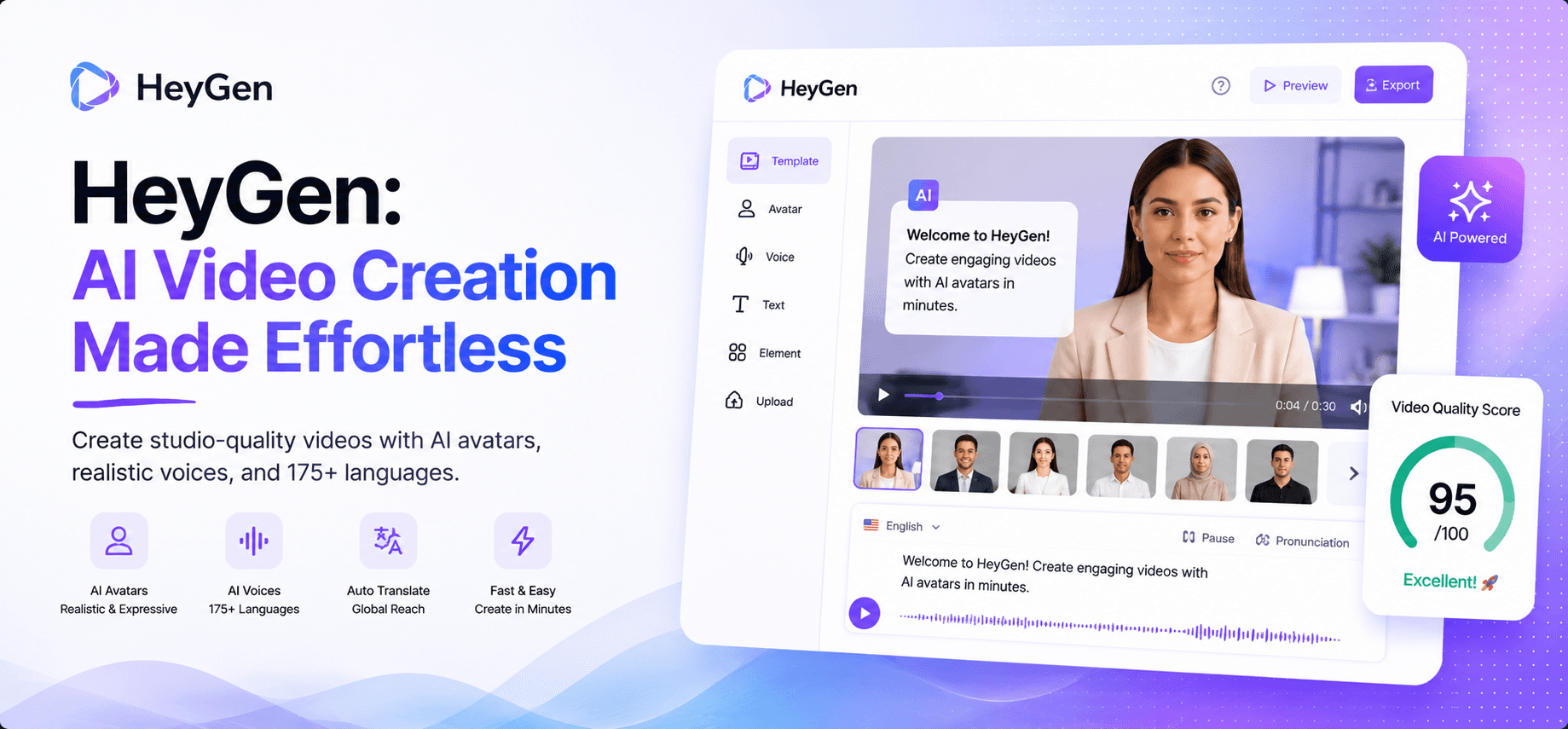
HeyGen's main dashboard — create avatar videos, clone yourself as a digital twin, or translate any existing video in three clicks.
3. Features & Competitive MOAT: What Makes HeyGen Worth Talking About
Every AI video tool in 2026 generates a talking head. Synthesia does it. D-ID does it. Even free tools slap a face on a script. So what separates HeyGen from the rest?
Three things: avatar realism, language translation with lip-sync, and the depth of its creative controls. These aren't incremental improvements — they're the reason HeyGen sits at 4.8/5 on G2 with over 630 verified reviews.
🧑💼 700+ Avatars — Including Avatar IV (The Scary-Good One)
HeyGen's avatar library has crossed the uncanny valley. The newest Avatar IV model can take a single photo of a person and generate a hyper-realistic talking avatar from it. Upload your headshot. Type your script. Watch yourself deliver it without ever turning a camera on. The lip-sync, skin texture, and subtle eye movement have reached a quality level where even careful viewers do a double-take.
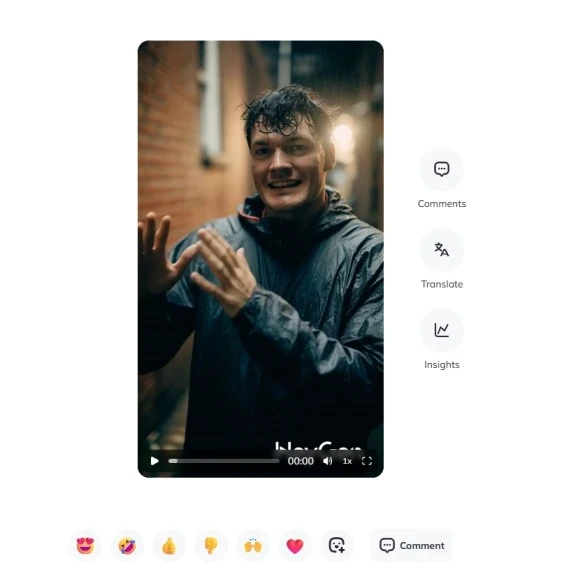
HeyGen Avatar IV: a single uploaded photo — transformed into a hyper-realistic talking avatar. This is the feature that makes you do a double-take.
🌍 Video Translation + Lip-Sync in 175+ Languages (The Actual Killer Feature)
Record your video once in English. Select a target language. HeyGen re-renders the avatar's mouth movements to match the translated audio — accurately, naturally, without reshooting a single frame. Spanish, Hindi, Mandarin, German, Arabic — 175 languages, instant turnaround. For any creator targeting international audiences, this single feature alone justifies the subscription cost.
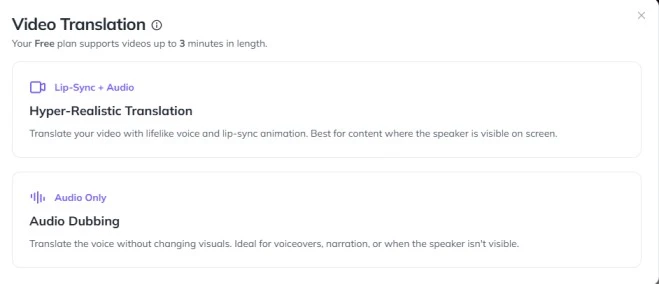
The HeyGen translation UI — select Hyper-Realistic or Audio Dubbing mode, pick your target language, and hit Translate. A 5-minute video is processed in under 3 minutes.
🧬 Custom Avatar — Your Digital Twin
Record two minutes of yourself speaking naturally to camera. HeyGen processes the footage and creates a digital twin — a custom avatar that looks and sounds exactly like you, available forever, usable on any plan. For personal brands, this is enormous. You can produce 30 videos from a single 2-minute recording session.
⚙️ ChatGPT + Canva Integration (Plus PPT to Video)
Stuck on the script? Click the ChatGPT button inside HeyGen's script panel, describe your video, and get a draft in seconds. Have a PowerPoint you want to convert into an avatar-narrated video? Upload it directly — HeyGen turns each slide into a scene and adds your avatar as the presenter. Canva designs import straight into the editor. These integrations aren't marketing fluff; they genuinely shave hours off the production workflow.
📊 HeyGen vs. The Competition
Feature | HeyGen | Synthesia | D-ID | Colossyan |
|---|---|---|---|---|
Starting Price | $29/mo | $29/mo | $5.9/mo | $27/mo |
Avatar Library | ✔ 700+ avatars | ⚬ 230+ | ⚬ 100+ | ✘ 30+ |
Video Translation + Lip-Sync | ✔ 175+ languages | ✔ 120+ | ⚬ Limited | ✔ 70+ |
Custom Avatar (Digital Twin) | ✔ All paid plans | ⚬ Enterprise only | ⚬ Limited | ⚬ Pro+ |
Photo → Talking Avatar (AI) | ✔ Avatar IV | ✘ No | ✔ Yes | ✘ No |
Avatar Emotions & Gestures | ⚬ Limited | ⚬ Limited | ⚬ Limited | ✔ Best-in-class |
PPT → Video | ✔ Yes | ✔ Yes | ✘ No | ✔ Yes |
Free Plan | ✔ 3 videos/mo | ✔ Limited | ✔ Yes | ✘ Trial only |
4. Pricing: Is It Worth the Bill?
Let's not dance around it. HeyGen isn't the cheapest tool in the AI video space. But compare it to what it replaces — and the maths changes quickly.
Free
$0/mo
no credit card needed
✓ 3 videos/month
✓ Up to 3 min per video
✓ 720p export
✓ 500+ stock avatars
✗ Watermark on videos
Most Popular
Creator
$29/mo
billed annually · 1 user
✓ Unlimited videos
✓ Up to 30 min per video
✓ 1080p · No watermark
✓ Voice cloning · Brand Kit
✓ 175+ languages
Pro
$99/mo
billed annually · power users
✓ Everything in Creator
✓ 4K export
✓ 10× generative AI credits
✓ Priority processing
✓ Early access to features
Business
$149/mo
+$20/seat · teams
✓ 60 min videos
✓ 5 custom avatars
✓ SAML/SSO · SCORM
✓ n8n, Make, HubSpot integrations
✓ Team collaboration workspace
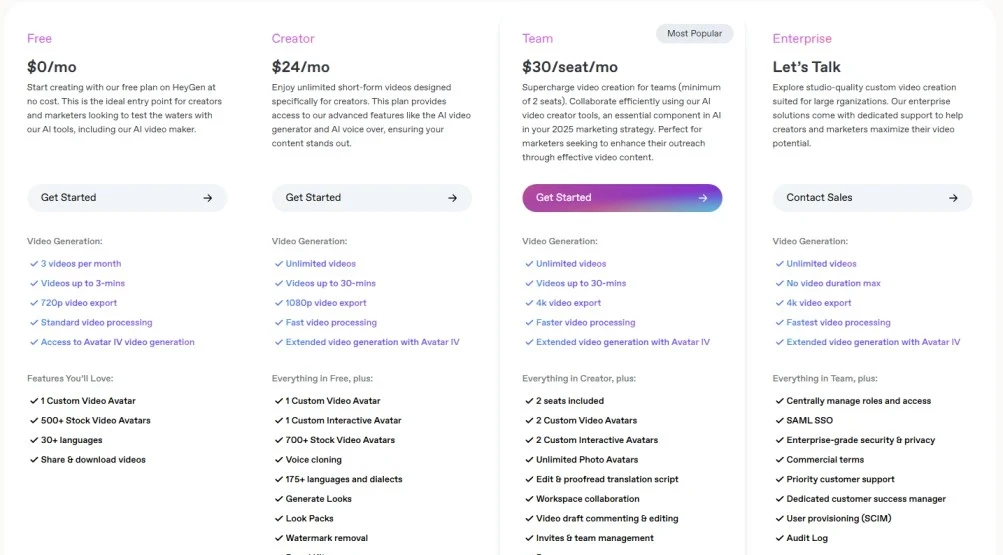
HeyGen's 2026 pricing tiers — the Creator plan at $29/month is where most solo creators and affiliate marketers will find their sweet spot.
The free plan is generous enough to evaluate the quality properly. Don't use your three free videos on 30-second tests — make one real piece of content and see if the avatar quality passes muster with your audience before upgrading.
5. Who Should Use HeyGen — And Who Shouldn't
HeyGen solves a very specific problem. Be honest about whether that's your problem before you subscribe.
✅ Use HeyGen If You Are…
A creator who hates being on camera
A marketer producing multilingual video content
An affiliate marketer adding video to your review stack
An L&D team building training video at scale
A brand that needs consistent video without a video team
❌ Skip HeyGen If You Are…
Building a personal brand on raw authenticity
Creating emotional storytelling content
On a sub-$29 monthly tool budget
Needing avatar gestures or expressions (try Colossyan)
Producing Hollywood-grade cinematic content
💡 The Honest Bottom Line on Fit
If you're currently avoiding YouTube because you don't want to be on camera, or if you're producing the same video in one language when your audience speaks five — HeyGen is almost certainly cheaper and faster than whatever workaround you're using right now. If you're already a confident on-camera creator with an established workflow, it's an optional add-on, not a necessity.
6. Step-by-Step: Creating Your First HeyGen Video
Here's exactly what happens from login to finished video — no fluff, no skipped steps.
Step 1 — Choose or Create Your Avatar
Log into app.heygen.com → Create Video → select an avatar from the 700+ library. Filter by gender, ethnicity, or style. Each avatar has multiple looks (business, casual, sport). Or go to the Custom Avatar section to upload a 2-minute recording of yourself and generate your digital twin.
Step 2 — Write Your Script (or Generate It with ChatGPT)
In the left panel, paste your script or click the ChatGPT button to draft one based on your topic. Choose your voice from 300+ options. Adjust pitch, speed, and emotional tone. Add pauses between sentences with the pause marker. Your avatar will speak exactly what you write, with natural intonation.
Step 3 — Design Your Scene
Position your avatar anywhere on the canvas. Pick a background — solid colour, gradient, your own image, or stock footage. Add text overlays, your logo, royalty-free music from the built-in library, and additional scenes if you need cuts. HeyGen auto-syncs video length to your script length.
Step 4 — Generate & Download
Click Submit. A 60-second video renders in 2–4 minutes. Download in 1080p (Creator plan) or 4K (Pro plan). You own full commercial rights. The video is ready to upload directly to YouTube, Instagram, or embed on your website.
🌍 Bonus: Translate Any Video in 3 Clicks
Go to Translate Video → upload your finished video → select source language (English) → select target language (Hindi, Spanish, Mandarin — any of 175+) → click Translate. In under 3 minutes your video is re-rendered with the avatar's mouth accurately lip-synced to the new audio. One recording session. Five languages. Zero reshoots.
⏰ One More Thing to Consider
Video content is projected to account for 82% of all internet traffic by 2027. Every month you're not producing video is a month your competitors are building the audience you're waiting to reach. HeyGen's free plan takes ten minutes to test. The opportunity cost of not testing it is considerably higher.
7. The Verdict
HeyGen isn't perfect. Avatar emotional range is still limited — if you need your presenter to look genuinely excited or sad, Colossyan does that better. The onboarding is clunky for new users. And the price jump from Creator ($29) to Pro ($99) has no middle ground, which frustrates creators who've outgrown the former but can't justify the latter.
But here's what those complaints miss.
HeyGen removes the single biggest friction point in content creation: you, on camera. For millions of creators, that friction was a full stop — no camera, no video content, no video audience. HeyGen turns that full stop into a comma. The content keeps going.
At $29/month for unlimited 1080p videos with voice cloning, brand kit, and 175-language translation — it's not a nice-to-have. It's the most cost-effective video production decision most solo creators will make this year.
8.6
HeyGen — Strongly Recommended for Video Creators
Out of 10 · Reviewed June 2026
Category | Score | Notes |
|---|---|---|
Avatar Quality & Realism | 9.0 / 10 | Avatar IV is genuinely impressive. Has crossed the uncanny valley. |
Video Translation | 9.5 / 10 | Best-in-class. 175+ languages with accurate lip-sync. |
Ease of Use | 7.5 / 10 | Moderate learning curve. Onboarding needs work. |
Feature Breadth | 9.0 / 10 | PPT to video, talking photo, screen recorder — unusually complete. |
Value for Money | 8.5 / 10 | $29/mo vs ₹25K/mo for a video editor. The maths is embarrassing. |
Avatar Emotions | 6.5 / 10 | The weakest area. Colossyan wins here if gestures matter to you. |
Try Before You Buy: HeyGen's free plan gives you 3 full videos with no credit card required. Make one real piece of content — a product review, an explainer, a tutorial intro — and measure whether your audience responds. If they do, the $29 Creator plan is one of the easiest upgrades in your tool stack.