In 2012, a guy named Chris Banks came back from a trip across South America and decided he was going to write a novel. There was one problem. Writing business reports and writing fiction turned out to be completely different skills, and the craft books he read gave him theory, not anything he could actually apply to his own pages. So he built a tool for himself instead. Launched in 2013, that tool became ProWritingAid.
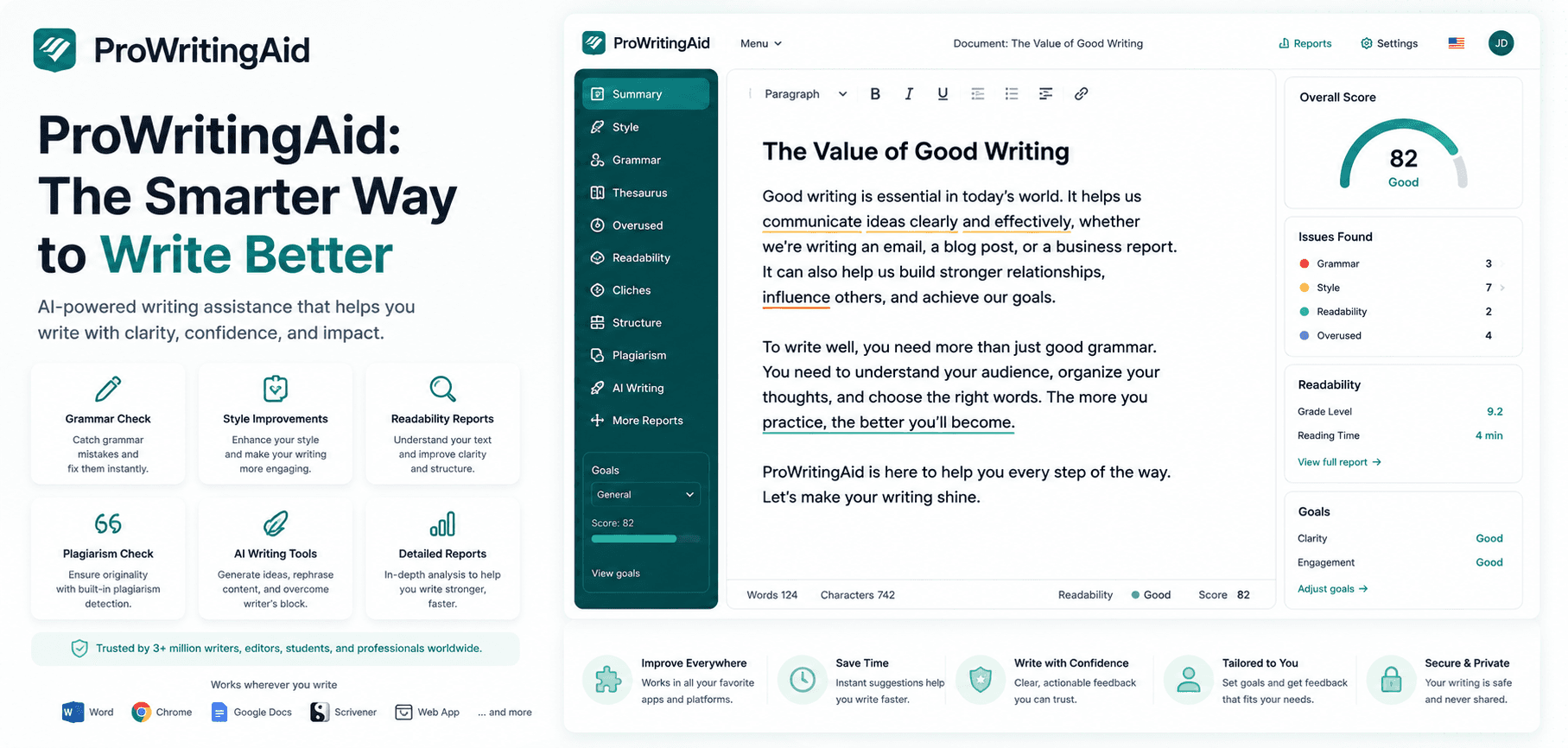
ProWritingAid is a grammar and style checker built for people who write a lot, not just people who need a typo caught before hitting send. It plugs into Word, Google Docs, Scrivener, and your browser, and layers 25+ style reports on top of the usual spelling and grammar checks, the kind of detail novelists, academics, and long-form editors actually want.
This review covers what those reports flag, what the free plan won't let you touch, what Premium costs in 2026, and whether it's worth picking over the more famous name in this category, Grammarly.
Short answer: ProWritingAid earns its keep if you write long documents, chapters, or manuscripts and want feedback on pacing and style, not just commas. If you mostly write emails and Slack messages, you probably don't need it.
Quick Verdict
Metric | Detail |
|---|---|
AIwithKay score | 7.8/10 |
Best for | Novelists, academics, and long-form writers who want style and pacing feedback, not just grammar fixes |
Starting price | Free, or roughly $10/month billed annually (Premium) |
Free plan | Yes, but capped at 500 words per check |
Standout feature | Compares your writing against 90+ published authors, including Stephen King |
Bottom line | The deepest style analysis in the category, at the cost of a busier, less polished interface than Grammarly |
What Works Well / What To Watch
What works well:
25+ style reports go past grammar into pacing, overused words, sentence length variation, and cliches, the kind of feedback a human editor gives, not just a spellchecker.
Native Scrivener integration, rare among grammar tools and a real draw for novelists who live in that app.
A genuine lifetime plan exists, so you can opt out of the subscription treadmill entirely if you would rather pay once.
Works inside Word, Google Docs, Scrivener, Vellum, and your browser, not locked into one writing environment.
The Author Comparison report benchmarks your writing style against 90+ published authors, a genuinely unusual feature.
What to watch:
The free plan's 500-word limit makes it hard to check anything longer than a blog post, so serious use means paying.
Annual Premium pricing rose from around $79 to $120 a year in 2026, a jump some longtime users flagged as steep for the same core features.
The interface feels more like a dense report dashboard than Grammarly's cleaner, chat-style suggestions. It takes some getting used to.
With 25+ reports running at once, new users can get buried in flags, and not every suggestion is one you should take.
What Is ProWritingAid, Exactly?
ProWritingAid started as one writer's personal tool, not a startup pitch. Banks holds a Master's degree in Experimental Psychology from Oxford and had a coding background, so when the craft books stopped being useful, he built a prototype that flagged his own bad habits: telling instead of showing, sentences that all ran the same length, words he leaned on too hard.
He shared it with a few other writers. They wanted it too. That response is what turned a personal project into a company, and ProWritingAid has been adding reports and integrations to it every year since, most recently AI features like Sparks and Chapter Critique. What started as one person's prototype now runs as a team of 40-plus people, still led by Banks.
Think of the core product less like a spellchecker and more like an opinionated writing tutor who never gets tired of pointing out that you used the word "suddenly" fourteen times in one chapter. A spellchecker tells you a word is wrong. ProWritingAid tells you a whole paragraph is dragging, and why.
The through-line matters for how you should think about the product. It was not built to replace an editor for a marketing team's Tuesday email. It was built by a writer, for the specific frustration of getting real, structural feedback on a long piece of writing when there is no human editor sitting next to you.
Key Features
ProWritingAid's feature list is long enough that it can feel like a lot on day one, so here's the short version of what actually matters and why.
25+ Writing Reports. Beyond grammar and spelling, ProWritingAid runs separate reports on overused words, cliches, sentence length variation, passive voice, transitions, and readability, each one actionable rather than a vague "this could be better."
Author Comparison. Measures your writing against 90+ published authors, including Stephen King, across metrics like sentence length and pacing. It is a genuinely unusual feature; no other mainstream grammar tool offers anything like it.
Sparks. An AI layer with two modes: Sparks Edit rewrites a flagged sentence for readability, and Sparks Inspire suggests dialogue or descriptive lines when you are stuck, useful for pushing past a blank page rather than writing the page for you.
Chapter Critique and Virtual Beta Reader. Feed in a chapter and get feedback on structure, pacing, and where a reader's attention might drop, framed like notes from a first reader, not a line edit.
Native Scrivener and Word Integration. Run reports directly inside Scrivener or Word without exporting your manuscript first, which matters more than it sounds once you are 60,000 words into a draft.
Realtime Checker and Browser Extension. Works in Gmail, Google Docs, and most places you type, catching grammar and style issues as you go, not just when you run a full report.
Wider App Support. Beyond the big three, it also connects to Vellum, Atticus, Notion, Apple Notes and Pages, and Wattpad, so most writers can plug it into whatever they already use to draft.
Hands-On: How It Actually Performs
A quick honesty check first. This review is based on ProWritingAid's own documented feature set, its help center, and its pricing pages, not a paid Premium subscription run over weeks of manuscript editing. Where a claim is ProWritingAid's own description of what a feature does, that is stated plainly rather than dressed up as something we personally tested at length.
What is genuinely testable on the free plan: paste in up to 500 words and the reports run instantly. Even in that limited window, the difference from a basic grammar checker is obvious. It does not just flag a comma splice, it tells you your sentences are running long and samey, points out three "just"s in one paragraph, and flags a stretch of passive voice you did not notice.
That is the pattern reviewers consistently report too. Capterra shows ProWritingAid at 4.7 out of 5 across nearly 500 verified reviews, with the recurring theme being depth of feedback over polish of interface. The reports are more useful the longer and more serious the piece of writing is; running a report on a two-line email is overkill, running one on a manuscript chapter is where it earns the subscription.
ProWritingAid Pricing (2026)
Plan | Price | What You Get |
|---|---|---|
Free | $0/month | 500-word limit per check, 2 report runs a day, 10 rephrases a day, 3 Sparks a day, basic grammar and spelling |
Premium (monthly) | $30/month | Unlimited word count and report runs, custom style guide, 5 Sparks a day, one chapter critique daily |
Premium (annual) | $120/year, about $10/month | Same as monthly Premium, billed once a year |
Premium Pro (monthly) | $36/month | Everything in Premium, plus 50 Sparks a day, three chapter critiques daily, live workshops with authors and editors |
Premium Pro (annual) | $144/year, about $12/month | Same as monthly Premium Pro, billed once a year |
Premium Lifetime | $399 one time | Premium features, paid once, no renewal |
Premium Pro Lifetime | $699 one time | Premium Pro features, paid once, no renewal |
Is it worth the price? For the annual Premium plan, yes, if you write regularly. At roughly $10 a month it undercuts Grammarly's equivalent tier and gives you deeper reports in return. The free plan is really a trial, not a usable everyday tool, given the 500-word ceiling. Worth noting for 2026: the annual plan's price climbed from about $79 to $120 over the past year or so, a real jump, so it is worth locking in a plan you are happy with rather than assuming next year's renewal holds the same price.
ProWritingAid vs Grammarly
Tool | Best For | Starting Price | Key Differentiator |
|---|---|---|---|
ProWritingAid | Novelists, academics, long-form editors | Free, or about $10/month annually | 25+ deep style reports, Scrivener integration, lifetime plan option |
Grammarly | Everyday email, docs, and Slack writing | Free, or about $12/month per member annually | Broader integration reach, more polished interface, tone detection |
Grammarly optimizes for correctness inside the apps you already use all day, Gmail, Slack, Docs, and it does that well, which is why it is still the safer everyday default for most people. ProWritingAid optimizes for something narrower and deeper: the craft of a long piece of writing. If you want the full picture on the other side of this comparison, our Grammarly review covers its recent rebrand to Superhuman Platform and where its AI features actually stand in 2026.
Neither tool fully replaces the other for a working novelist. Plenty of authors run Grammarly for daily correctness and ProWritingAid for a structural pass before sending a manuscript to an editor. Pricing tells a similar story: Grammarly's Plus tier costs a couple of dollars more a month, but you are paying for reach across more apps, not necessarily for deeper feedback on a 300-page draft.
Who Should Use ProWritingAid (And Who Should Skip It)
Best for:
Novelists and fiction writers who want pacing, dialogue, and style feedback beyond grammar
Academics and long-form nonfiction writers who need readability and structure checks across long documents
Writers already working in Scrivener who want reports without exporting first
Anyone who wants a one-time lifetime purchase instead of another monthly subscription
Skip it if:
You mainly write short emails, Slack messages, or social posts, where Grammarly's lighter, everywhere-you-type approach fits better
You want the cleanest, least cluttered interface possible; ProWritingAid's report-heavy dashboard takes some adjustment
You are not ready to pay; the free plan's 500-word cap makes it hard to evaluate on anything beyond a short sample
Final Verdict
ProWritingAid is not trying to be Grammarly, and that is the point. It was built by a writer who needed a second pair of eyes on a manuscript and could not find software that gave him more than a grammar pass. Thirteen years later, that is still exactly what it is best at: the kind of structural, pacing, and style feedback a good editor gives, not a spellchecker with a friendlier name.
If you are writing a book, a thesis, or anything else long enough that pacing and repetition actually matter, ProWritingAid at roughly $10 a month is one of the more specific, genuinely useful tools you can add to your writing process. If your longest piece of writing this month is an email, save your money and stick with a free grammar checker instead.
Start on the free plan to see how the reports read against your own writing, then decide if the 500-word ceiling is worth paying past. You can check the free plan and current pricing directly on ProWritingAid's site.
Curious to see how it performs?
Try
ProWritingAid
Now
GOT ANY QUESTIONS LEFT?
Is ProWritingAid better than Grammarly?
Is ProWritingAid free to use?
Does ProWritingAid have a lifetime plan?
What does ProWritingAid's Author Comparison feature do?