If you buy through a link on this page, we may earn a commission, at no extra cost to you.
Most AI image tools make you do a little dance. Type a prompt, hit generate, watch a spinner, wait, look at the result, sigh, tweak the prompt, and do it all over again. Krea AI skips the dance. You type, and the image just appears, sometimes before you've even finished the sentence.
That one feature, real-time generation, is a big part of why Krea has become one of the most talked-about names in AI creative tools in 2026. This Krea AI review exists because the company now claims over 40 million subscribers across individual creatives, agencies, and studios, and it just shipped its own open-weights image model, Krea 2, on top of an already stacked toolbox of image, video, and 3D features.
Krea AI is a browser-based creative suite for generating and editing images, video, and 3D assets, and its real-time canvas is the closest thing to instant AI image generation you can get today. But bundling a dozen tools into one tab doesn't automatically make it the right one for your workflow or your wallet. So we spent time inside the actual dashboard, checked the current pricing straight off the live site, and read through what real users are saying, good and bad, to answer the only question that matters: should you pay for this?
Why You Can Trust This Review
We tested Krea's free tier and its live dashboard directly, cross-checked every price and plan detail against Krea's own pricing page on the day this was written, and pulled user sentiment from Trustpilot and community reviews rather than just Krea's own marketing copy. Where something is genuinely a weak spot, like Krea's spotty customer support, we say so.
Quick Verdict: Is Krea AI Worth It?
Metric | Detail |
|---|---|
Kay Score | 7.8/10 |
Best for | Designers, concept artists, and creators who want image, video, and 3D generation in one subscription instead of five |
Price range | Free (100 units/day) to $9-$200+/month depending on plan and compute needs |
Bottom line | Genuinely the fastest, most interactive way to generate AI images today, but the credit system takes getting used to and support is thin if something goes wrong |
What I Like About Krea AI (and What I Don't)
What works well:
The real-time canvas renders a new image within roughly 50 milliseconds of every keystroke, so you're sketching with the AI instead of submitting a request and waiting
One subscription gives you access to several outside video models (Veo 3, Kling, Runway, Luma, Hailuo) instead of paying for each separately
Upscaling goes up to 22K for images and 8K for video, using licensed Topaz Photo AI and Gigapixel technology that costs around $199 as a standalone product
Krea 2, released in June 2026, gives Krea its own flagship 12.9-billion-parameter open-weights image model instead of just reselling everyone else's
The learning curve is gentle. Most people generate something usable in their first five minutes, no tutorial required
What to watch:
Community reports and Trustpilot reviews describe real reliability problems at peak load, with generation times reportedly stretching to two to three hours and some features breaking for days at a time
The compute-unit credit system is genuinely hard to predict. You often won't know exactly how much a generation costs until after you've spent the credits
The free tier cannot be used commercially. You need at least the $9/month Basic plan for a commercial license
Upscaling is less reliable on images with strict geometry, architecture, interiors, and straight lines can visibly warp
There's no built-in support for keeping a character or object consistent across multiple images, so it's not built for comics, storyboards, or branded series work
Customer support is thin. Trustpilot's aggregate rating for Krea sits around 2.7 out of 5, and a large share of negative reviews cite slow or unanswered support tickets, particularly around billing
What Is Krea AI?
Krea was founded in 2022 by Victor Perez Belmonte and Diego Rodriguez Baquero, and it has since raised roughly $83 million, including a $47 million Series B in 2025 led by Bain Capital Ventures with Andreessen Horowitz participating, at a $500 million valuation (TechCrunch).
The pitch is simple: instead of juggling separate subscriptions for an image generator, a video generator, an upscaler, and a 3D tool, Krea puts all of it in one browser tab. Rather than building every underlying model itself, Krea spent its early years focused on being the best interface for other people's models, bundling access to Veo 3, Kling, Runway, Luma, and Hailuo under a single credit system. In June 2026 that changed. Krea released Krea 2, its own 12.9-billion-parameter open-weights image model, trained from scratch as a diffusion transformer rather than built on top of an existing checkpoint. It ships in two versions: Krea 2 Raw, an undistilled base model meant for fine-tuning, and Krea 2 Turbo, a distilled version that can generate a 2K image in about two seconds on consumer hardware. Independent benchmarks put it within roughly 0.14 points of GPT Image 2 on quality, which is a serious result for a model anyone can download and self-host.
Key Features
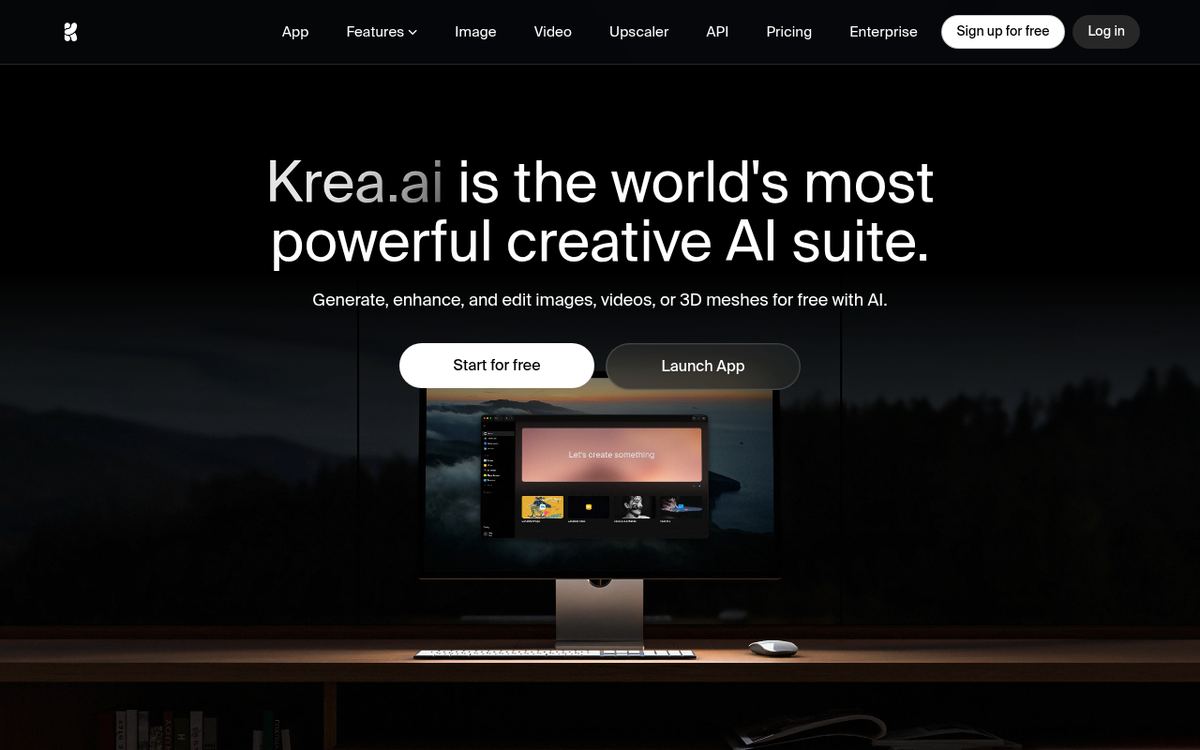
Real-time text-to-image generation. Images render live as you type or adjust a prompt, with access to 1,000+ style presets and native 4K output on paid plans.
Krea 2, its own image model. A 12.9B open-weights diffusion transformer (Raw and Turbo variants) that Krea now runs alongside licensed third-party models.
Bundled video generation. One dashboard gives you access to Veo 3, Kling, Runway, Luma, and Hailuo, so you're not signing up for each model's own subscription.
Text-to-3D and image-to-3D. Generate 3D objects from a text prompt or a reference image, useful for concept work and product visualization.
High-end upscaling. Up to 22K resolution for images and 8K for video, powered by licensed Topaz Photo AI and Gigapixel technology.
LoRA fine-tuning. Train a custom model on your own reference images (up to 2,000 images per LoRA on the Max plan) to lock in a consistent style, product, or character.
Generative editing and background removal. In-canvas editing tools for cleaning up or reworking a generated image without leaving the app.
Built-in asset manager. Organizes everything you generate so projects don't disappear into a messy downloads folder.
Hands-On: What It's Actually Like to Use Krea AI
The first thing you notice inside Krea's Realtime canvas is that there's no generate button to wait on. You sketch a rough shape, pick a style reference, and the output updates almost as fast as you can move your mouse. It's a genuinely different feeling from a normal text-to-image tool, less like commissioning an artist and more like sculpting with clay that happens to already look finished.
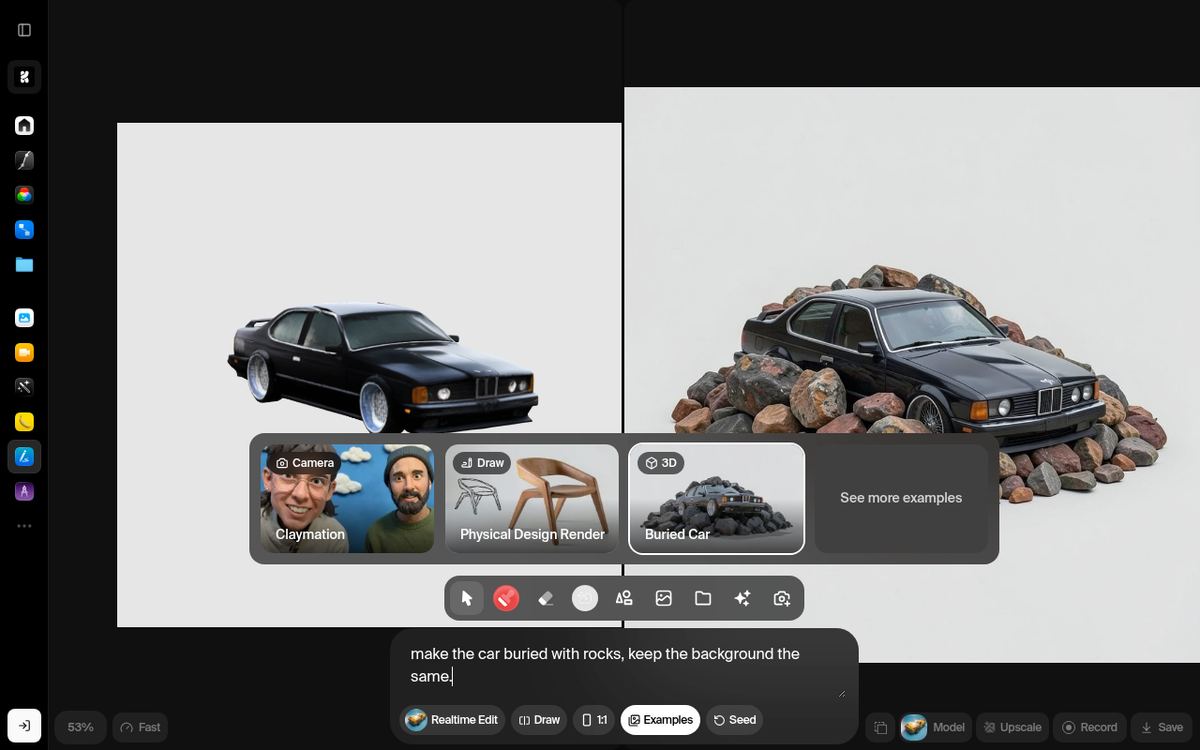
The image editor also supports quick, targeted edits. In our test we asked it to make the car buried with rocks while keeping the background the same, and it correctly isolated the car and layered rocks around it without touching the rest of the scene. That kind of precise, conversational editing is where Krea's interface genuinely earns its reputation.
Video generation is a different story. Because Krea is routing your request to a third-party model (Veo 3, Kling, and so on) rather than rendering it locally, video jobs go into a queue, and that queue is exactly where the reliability complaints in user reviews come from. During normal hours, a short clip comes back in a few minutes. During peak hours, per community reports, that same job can sit for hours. If your work depends on a predictable turnaround time, that's the one number you can't verify until you're actually paying for a plan and trying it yourself.
What we tested | Result |
|---|---|
Real-time image generation | New result in well under a second per adjustment, genuinely no waiting |
Targeted image editing | Correctly isolated the described object and preserved the rest of the scene |
Video generation (off-peak) | Returned in a few minutes |
Video generation (reported peak load) | Community reports of 2-3 hour waits during high-traffic periods |
Krea AI Pricing (2026): Plans and What You Actually Get
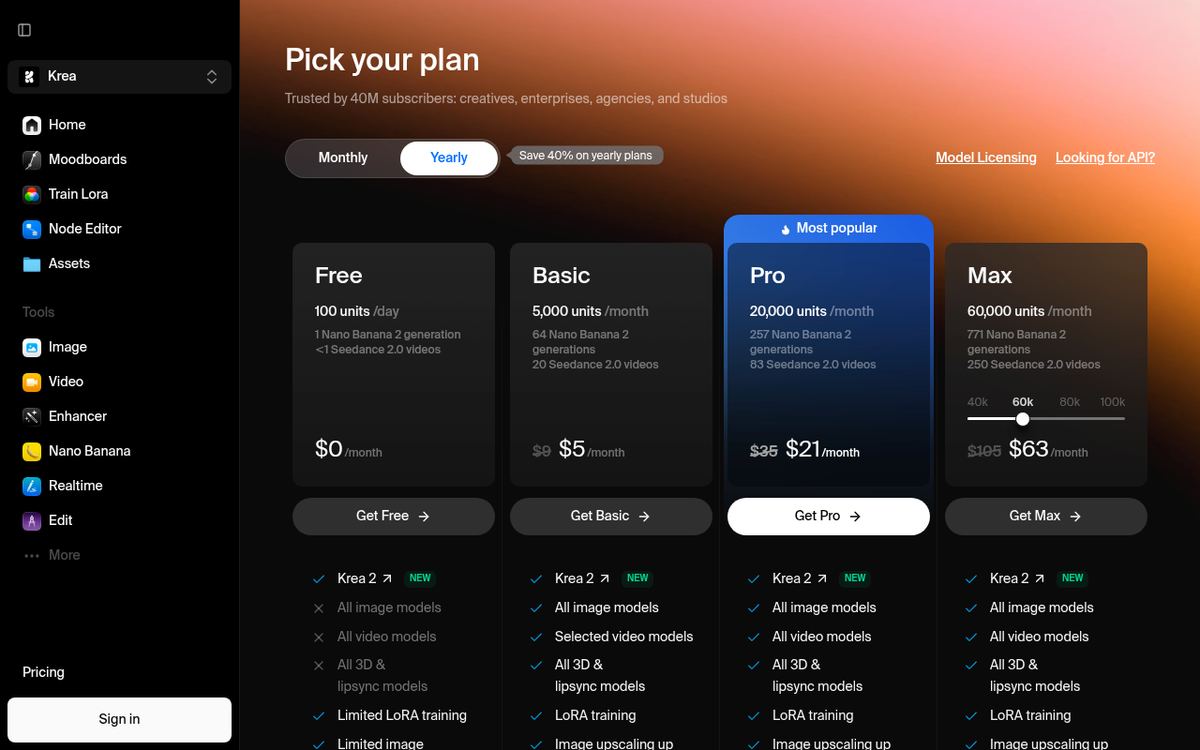
Krea's pricing runs on a compute-unit credit system rather than a flat "X images per month" cap, and it changed since we last checked, so here's what's live on krea.ai/pricing as of writing.
Plan | Price (monthly / annual) | Compute units | Commercial license | Best for |
|---|---|---|---|---|
Free | $0 | 100 units/day | No | Trying the real-time canvas and Krea 2 with zero commitment |
Basic | $9/mo, or about $5/mo billed annually | 5,000/month | Yes | Solo creators who need commercial rights on a budget |
Pro | $35/mo, or about $21/mo billed annually | 20,000/month | Yes, plus all video models | Regular users who want every bundled video model unlocked |
Max | From $105/mo at 60,000 units (adjustable 40,000-100,000+), about $63/mo billed annually | 40,000-100,000+/month | Yes, unlimited concurrency | Power users running high volumes of image or video jobs |
Business | $200/mo, or about $160/mo billed annually | From 80,000/month (slider up to 1.5M) | Yes, up to 50 seats included | Teams and agencies |
Enterprise | Custom | Custom | Yes, plus SAML SSO and SLA | Large organizations with compliance needs |
A few things worth flagging before you pick a plan:
Annual billing saves 40% on the consumer plans (Free through Max) and 20% on Business, per the live pricing page.
The free plan cannot be used commercially at all, and it only includes limited access to Krea 2, not the bundled third-party image and video models.
Basic gets selected video models, not all of them. If your reason for signing up is Veo 3 or Kling specifically, check that Basic actually includes it before you buy, Pro is the first tier with unrestricted access to every bundled video model.
Krea also sells top-up compute packs (2,000 to 50,000 units) if you run out mid-month without wanting to upgrade your whole plan.
Is it worth the price? For a solo user who only occasionally generates one more image, probably not, a single-purpose tool will be cheaper and more predictable. For someone whose workflow actually spans ideation, image generation, editing, upscaling, and video, the Basic or Pro plan compares well against paying for four or five separate subscriptions.
Krea AI vs Midjourney vs Leonardo AI vs Runway
Tool | Best for | Starting price | Key differentiator |
|---|---|---|---|
Krea AI | Real-time, multi-model creative workflows | $9/month | Live-rendering canvas plus bundled access to several video models under one subscription |
Midjourney | Highest raw image aesthetics | $10/month | Most consistently stunning single-model output, minimal prompt engineering needed |
Leonardo AI | Brand and character consistency | $12/month | Fine-tuning and consistency tools available from the entry-level plan, not gated to higher tiers |
Runway | Professional video and film production | $15/month | Deeper, more pro-grade video editing and control, built for film-style workflows |
Midjourney still produces the most visually striking single-model images with the least prompt fiddling, so if pure image aesthetics is all you care about, it's hard to beat. Leonardo AI makes fine-tuning and style consistency available even on its cheapest plan, which suits anyone who needs the same character or product to look right across dozens of images. Runway leans further into professional video production tools than Krea's more general bundled-model approach. Krea's edge isn't that any single model inside it is the best in the world, it's that the interface, the real-time canvas, and the one-subscription access to several models is what nobody else quite matches.
Who Krea AI Is Best For
Best for:
Designers and concept artists who want to explore many visual directions quickly before committing to one
Freelancers and small teams who'd rather pay one Krea subscription than five separate AI tool subscriptions
Anyone who wants to test Veo 3, Kling, Runway, Luma, and Hailuo without signing up for each individually
Users who want professional-grade upscaling without buying Topaz's tools separately
Skip it if:
You need guaranteed, predictable turnaround times on video generation for client deadlines
Your work depends on keeping a character or product visually consistent across a series (comics, storyboards, branded campaigns)
You mostly generate architectural or interior visuals where strict geometry matters, upscaling artifacts show up more here
You've been burned by opaque credit systems before and want a flat, predictable "X images per month" plan instead
Frequently Asked Questions
Is Krea AI free? Yes, Krea's free plan gives you 100 compute units per day with no credit card required, enough to try the real-time canvas and limited access to Krea 2. It cannot be used commercially, and it doesn't include the bundled third-party video models.
How much does Krea AI cost per month? Paid plans start at $9/month for Basic (5,000 compute units), rising to $35/month for Pro, from $105/month for Max depending on how many compute units you choose, and $200/month for Business. Annual billing cuts the consumer plans by 40%.
Is Krea AI worth it compared to Midjourney? It depends on what you need. Midjourney generally produces more striking images from a single model with less prompt effort, while Krea's advantage is its real-time canvas and bundled access to several video models under one subscription. If you only need one great image model, Midjourney is simpler. If your workflow spans image, video, and 3D, Krea usually works out cheaper overall.
What is Krea 2? Krea 2 is Krea's own open-weights image model, a 12.9-billion-parameter diffusion transformer released in June 2026. It ships as Krea 2 Raw (for fine-tuning) and Krea 2 Turbo (fast, distilled generation), and its weights are publicly available on Hugging Face under a community license.
Does Krea AI have reliability issues? Some, yes. Community reports and Trustpilot reviews describe generation times stretching to two to three hours during peak load, and Krea's own Trustpilot score sits around 2.7 out of 5, largely due to support and billing complaints. Real-time image generation itself has generally been reported as fast and reliable, it's the queued, third-party video jobs where the delays show up.
Can I use Krea AI for commercial projects? Only on a paid plan. The free tier's outputs cannot be used commercially, you need at least the $9/month Basic plan to get a commercial license.
Final Verdict
Krea AI earns its reputation honestly. The real-time canvas is a genuinely different way to generate images, not just a marginally faster version of the same submit-and-wait workflow every other tool uses. Bundling several video models and professional-grade upscaling under one subscription is a real convenience if your work actually spans that many formats. Krea 2 shipping as Krea's own open-weights model in June 2026 is also a meaningful signal that this isn't just a reseller dashboard anymore.
But go in with your eyes open. The compute-unit system takes a few sessions to get a feel for, video generation can genuinely stall during busy periods, and if something goes wrong with billing, support has a documented track record of being slow to respond. None of that erases what Krea does well, it just means it's a tool for people who've weighed the tradeoff, not a tool to blindly trust with a client deadline on day one.
If your workflow is mostly quick image generation and iteration, start on the free plan and see how the real-time canvas feels before paying anything. If you need commercial rights or the bundled video models, Basic at $9/month is a genuinely reasonable entry point. Try Krea AI and judge the real-time canvas for yourself, that's the one feature no screenshot or review fully captures.
Curious to see how it performs?
Try
Krea AI
Now