Guide
Kling AI Review 2026: The AI Video Model That Finally Crossed the Line Between Artificial and Cinematic
1. The Day AI Video Finally Looked Real
There's a specific moment every creator remembers from 2023 and 2024 when they tried AI video for the first time. The limbs were wrong. The faces melted. Motion was soupy. You typed "a woman walks down a beach" and got something that looked like a fever dream rendered at 12 frames per second. The technology was impressive in theory. In practice, it was unusable.
Then Kling 3.0 shipped.
Chase Jarvis — professional photographer and one of the most credible voices in the creative industry — spent 48 hours running Kling 3.0 through rigorous real-world tests and called it: "arguably the most capable general-purpose video model available right now." On par with Google's Veo 3.1. Possibly better in some ways. The walk down the beach test? He wrote: "The movement felt weighted, natural, and fluid." No notes.
Kling AI, made by Kuaishou — the Chinese tech giant behind a platform that rivals TikTok in scale — has quietly gone from an experimental curiosity to the benchmark that every other AI video model is now measured against. That matters enormously for creators who need cinematic B-roll, for marketers building video ads, and for anyone who has watched AI video progress and wondered: when does it become good enough to use professionally?
The answer, as of Kling 3.0, is: now. With some important caveats.
1080pVideo at 30fps — cinematic grade output
15sMax clip length in Kling 3.0
3 minMax clip length on paid plans (v2.6)
$0Free daily credits — no card needed to start
"Kling 3 is likely the best general-purpose video model on the market right now. For 90% of creators, 90% of the time — whether you're building B-roll for YouTube, social ads, or pitch decks — this is ready for prime time."— Chase Jarvis, professional photographer & filmmaker, February 2026
2. What Is Kling AI?
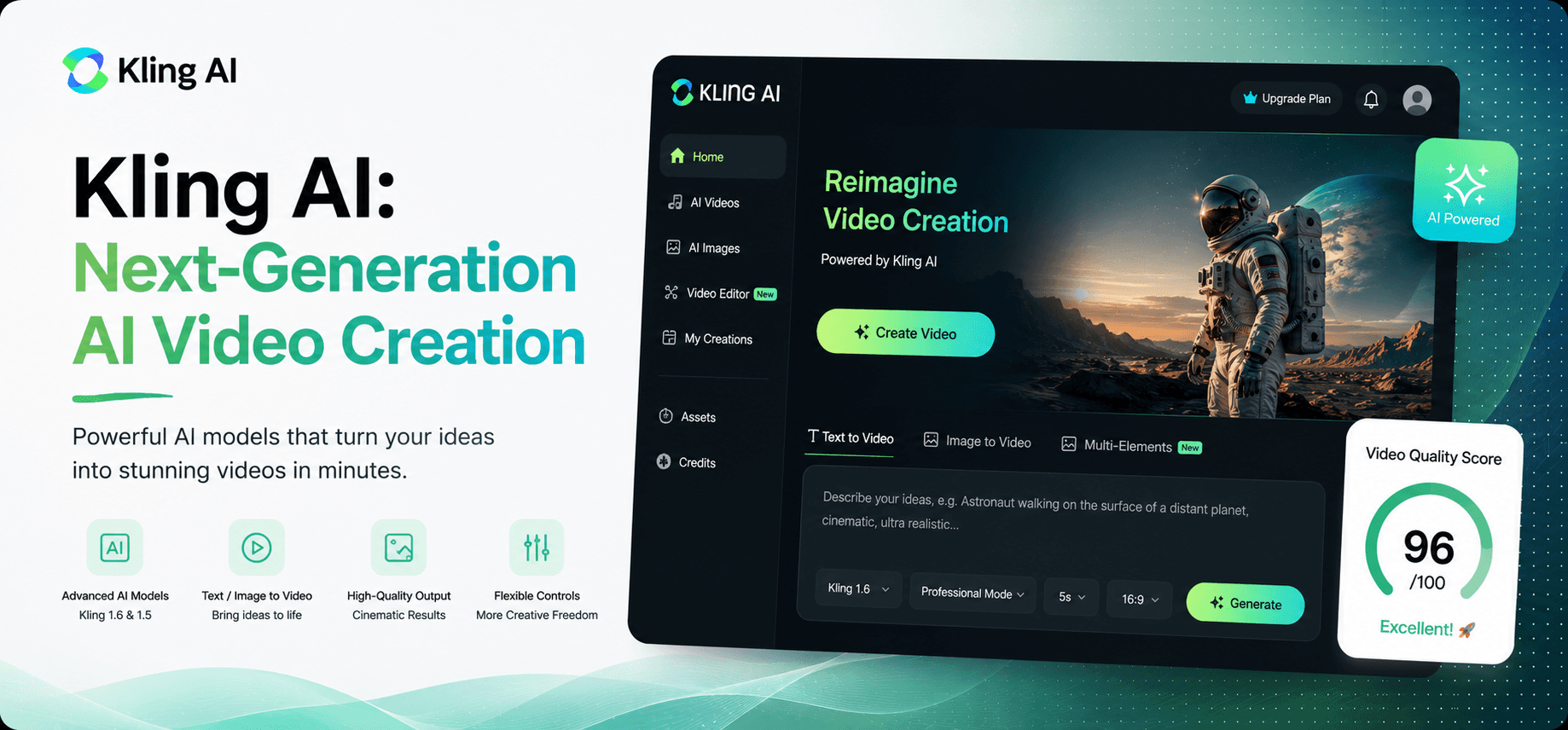
Kling AI is a generative AI video platform built by Kuaishou, one of China's largest technology companies. Think of it as a video studio that fits in a browser tab. You describe what you want — or upload an image — and Kling generates a short video clip. No camera. No location scouting. No editor. No crew.
What separates Kling from the crowded field of AI video tools is the underlying model quality. Kuaishou's research team has built technology that specifically addresses the two hardest problems in AI video: realistic motion physics and character and object consistency across frames. Earlier AI video models failed at both. Kling 3.0 has made them feel almost routine.
It launched internationally in mid-2024, gained traction rapidly among filmmakers and visual effects artists, and has since been integrated into third-party platforms including Artlist, Higgsfield, Weavy, and Flora — meaning you can access Kling's models even if you don't subscribe directly through kling.ai.
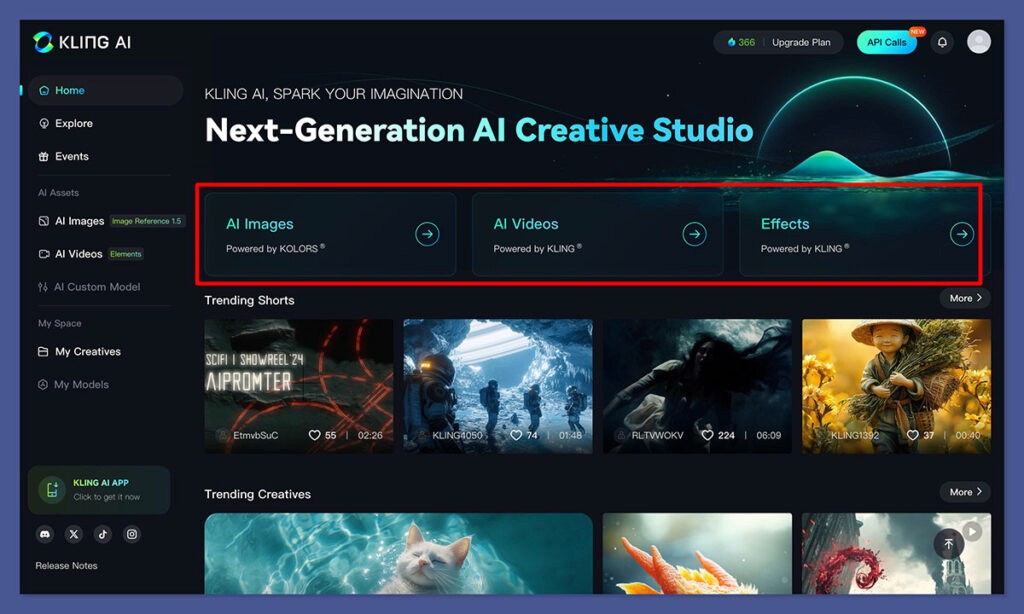
Kling AI's creation interface — input a text prompt or upload an image and the model generates a cinematic video clip in minutes.
3. Kling 3.0 — What's New and Why It Matters
Kling 3.0 isn't a resolution bump. It introduces capabilities that fundamentally change what is possible for solo creators and small production teams — things that previously required a full post-production pipeline.
🎬 Multi-Shot Generation — Chain Scenes Like a Director
Previous versions of Kling generated individual clips in isolation. Kling 3.0 lets you chain multiple shots together coherently, specifying the exact duration of each shot. Wide establishing shot → medium coverage → close-up — all generated in sequence, all visually consistent. This is the workflow professional directors use. Now it's accessible from a text prompt.
🎯 Reference Elements — Consistency Across Every Shot
This is the game-changer that Chase Jarvis highlighted. You can now upload a specific "element" — a character's face, a product, a logo, a garment — and Kling will maintain that element consistently across different shots and scenes. He tested it with an Aviator Nation hoodie across multiple different camera angles. The hoodie didn't morph. The text on it remained legible. For brand video production, this alone changes everything. Client product shots that previously required reshoots now just require a reference image.
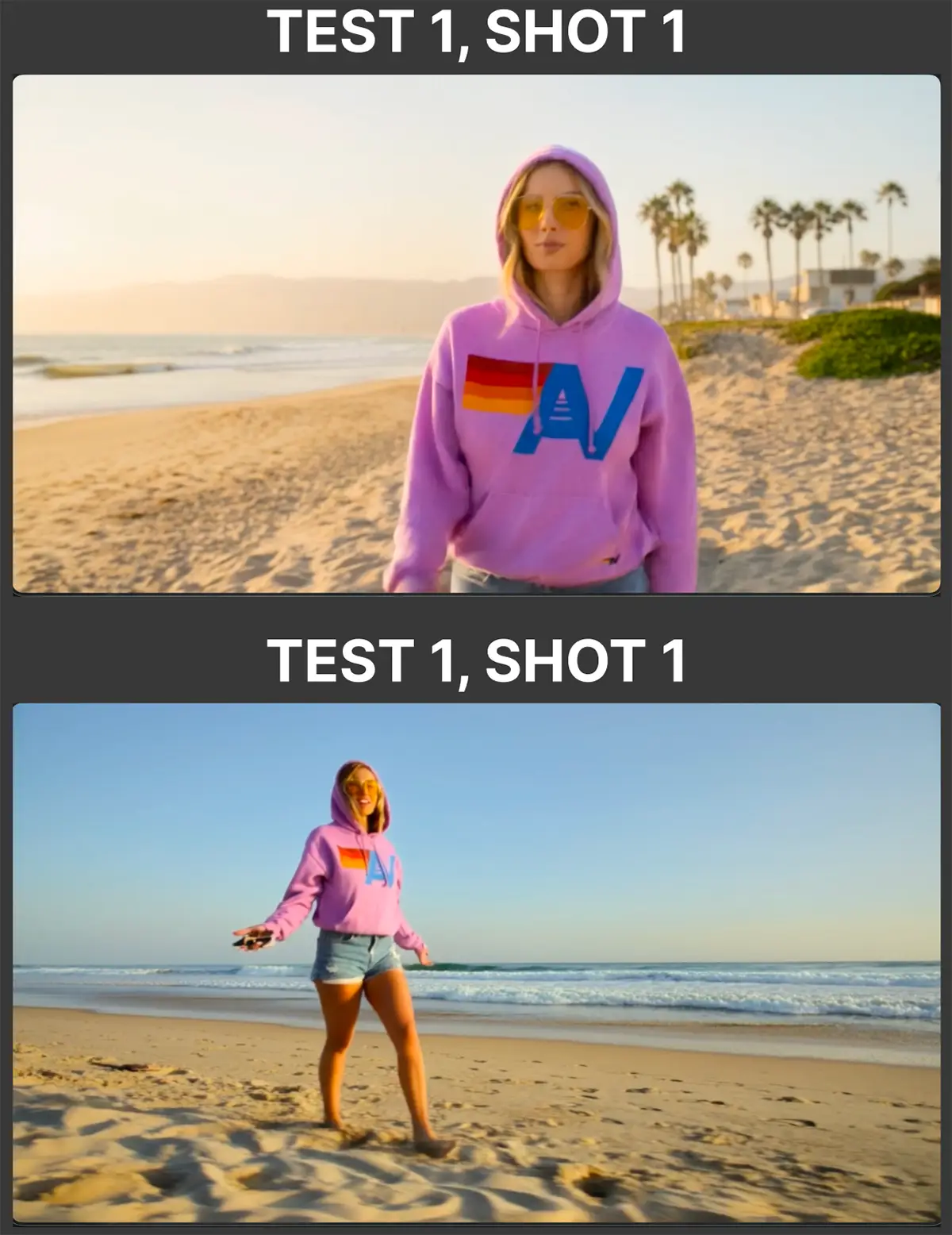
Chase Jarvis's Kling 3.0 test: the Elements feature maintained perfect visual consistency of a branded hoodie across multiple distinct shots — a capability that previously required reshoots.
✂️ Kling 3 Edit — Style Transfer and Video-to-Video
Generate a realistic video, then push it into an entirely different artistic style — watercolour, collage, film noir, animation. Kling 3 Edit applies style transfer frame-by-frame without the jittery flickering that plagued earlier AI editing tools. The watercolour test from Chase Jarvis's review was described as "incredibly well done" — the AI understood paint texture and applied it consistently across motion. This opens up a new creative workflow: shoot (or generate) in realism, then style in post using Kling 3 Edit.
🔊 Improved Audio — Languages, Accents, Lip-Sync
Kling 3.0 significantly improved audio handling — better language support, accent recognition, and the lip-sync feature that matches mouth movements to an audio track. For creators producing multilingual content or dialogue-driven scenes, this removes a major blocker. Previously, lip-sync in AI video was a party trick. In Kling 3.0, it's a production-grade tool.
🕹️ Advanced Controls — Camera, Motion, Aspect Ratios
Kling gives you granular control over camera movement (pan, tilt, zoom, dolly), motion intensity (how kinetic versus static the clip feels), negative prompts (what to explicitly exclude from the output), creativity versus relevance sliders, and aspect ratios for every platform — 16:9 for YouTube, 9:16 for Reels and TikTok, 1:1 for Instagram. These aren't surface-level controls — they meaningfully change the output and let you iterate toward a specific creative vision rather than hoping the model guesses right.
📊 Kling AI vs. The Competition
Feature | Kling 3.0 | Runway Gen 3 | Sora 2 | Veo 3.1 |
|---|---|---|---|---|
Starting Price | $0 free / $6.99/mo | $15/mo | ChatGPT Plus $20 | via Artlist / Google |
Photorealism | ✔ Best-in-class | ✔ Excellent | ✔ Excellent | ✔ Excellent |
Character Consistency | ✔ Elements feature | ⚬ Limited | ⚬ Moderate | ✔ Reference mode |
Multi-Shot Generation | ✔ Yes (Kling 3.0) | ✘ No | ⚬ Storyboard mode | ⚬ Via Flow |
Style Transfer (Video Edit) | ✔ Kling 3 Edit | ✔ Yes | ✘ No | ✘ No |
Max Clip Length | 15s (3 min v2.6) | ⚬ 10s | 20s | 8s (upgradeable) |
Free Plan | ✔ Daily credits | ⚬ Trial only | ✘ No | ✘ No |
Customer Support | ✘ Very weak | ✔ Responsive | ⚬ Via OpenAI | ⚬ Via Google |
4. Pricing: The Good, the Confusing, and the Gotcha
Kling AI's pricing is more accessible than most people expect for model quality at this level. But there is a critical gotcha baked into the system that you need to know about before you spend a single dollar.
Basic (Free)
$0/mo
no credit card needed
✓ 166 free credits/month
✓ Text-to-video & image-to-video
✗ Long generation wait times
✗ Watermarked output
Standard
$6.99/mo
660 credits/month
✓ Fast-track generation
✓ No watermark
✓ Video extension feature
✗ No priority queue
Most Popular
Pro
$25.99/mo
3,000 credits/month
✓ Everything in Standard
✓ Priority access to new features
✓ Longer video generation
✓ Bulk credit efficiency
Premier
$64.99/mo
8,000 credits/month
✓ Highest credit volume
✓ All features unlocked
✓ Ideal for studios & agencies
✓ Pay-as-you-go top-ups
⚠️ The Credit Expiry Problem — Read This Before You Subscribe
Kling AI's credit system has one significant flaw that has generated substantial negative user feedback: paid credits expire if not used within a billing period. This is not standard practice. Most credit-based platforms let you roll over unused credits or keep them indefinitely. On Kling, if you pay for a Pro plan, get busy for a few weeks, and don't use all 3,000 credits — they're gone. Permanently. Multiple verified user reviews on Trustpilot and Reddit describe this as feeling like money taken without delivering value.
What to do about it: Only subscribe at the tier you can realistically exhaust each month. If you're unsure, start with Standard or use pay-as-you-go credit top-ups. Verify the current credit policy on kling.ai/pricing before purchasing, as Kuaishou may update it.
5. Who Should (and Shouldn't) Use Kling AI
Kling AI is not the right tool for every video use case. The distinction matters because its pricing structure penalises casual, sporadic use.
✅ Use Kling AI If You Are…
A filmmaker or videographer needing cinematic B-roll
A brand marketer producing consistent product video
A YouTuber building background footage for explainer videos
A visual effects artist needing realistic motion reference
Anyone producing high-volume video content on a predictable schedule
❌ Skip Kling AI If You Are…
A casual creator who uses video tools sporadically
Needing avatar/talking-head videos (use HeyGen instead)
Creating abstract, design-heavy or illustration content
Likely to need customer support (it's essentially absent)
Unable to reliably use your credits before they expire
💡 The Alternative Access Path Nobody Talks About
You don't have to subscribe to kling.ai directly to use Kling 3.0. Artlist's AI Creator plan ($41.67/mo) includes Kling 3.0 and Kling 3.0 Motion Control as models within its AI Toolkit — alongside Sora, Veo, Seedance, and 90+ other models. Higgsfield, Weavy, and Flora also offer Kling integrations with stronger UI support for multi-shot workflows. If the credit expiry issue concerns you, using Kling through a third-party platform can give you access to the model under better account terms.
6. Step-by-Step: Creating Your First Kling Video
Here is exactly what happens from signup to finished clip. No steps skipped.
Step 1 — Create a Free Account at kling.ai
Go to kling.ai → click Sign Up → register with Google or email. No credit card required. You receive 166 free credits per month on the Basic plan. These are enough to generate several test clips at standard quality before deciding whether to upgrade.
Step 2 — Choose Your Generation Mode
On the dashboard, select Generate → you'll see options for Text-to-Video (type a prompt) and Image-to-Video (upload an image as the starting frame). For your first test, use Image-to-Video — upload a high-quality photo and describe how you want it to move. This tends to produce more reliably impressive first results than a cold text prompt.
Step 3 — Write a Cinematic Prompt (This Is the Key)
Kling responds extremely well to cinematic language. Don't write "a woman walking on a beach." Write: "Slow-motion wide shot, a woman walks along a sun-drenched beach at golden hour, soft waves breaking in the foreground, warm light creating long shadows, photorealistic, 35mm film grain, natural movement." The more specific the visual language, the better the output. Use negative prompts to exclude: "no distortion, no unnatural motion, no blurry faces."
Step 4 — Set Your Parameters
Choose your aspect ratio (16:9 for YouTube/landscape, 9:16 for Reels/TikTok). Set clip duration (5s for testing, longer for final shots). Adjust the creativity slider — lower values keep the output closer to your prompt literally, higher values give the model more interpretive latitude. For brand or product work, keep creativity low. For artistic B-roll, push it higher.
Step 5 — Generate, Review, and Iterate
Hit Generate. On a paid plan, expect 2–5 minutes. On the free plan, expect considerably longer during peak hours. Review the output honestly — if the motion is wrong or the scene missed your intent, adjust the prompt and regenerate rather than settling for a mediocre clip. Budget for 2–3 iterations per final shot when estimating credit usage.
Step 6 — Try Multi-Shot Generation (Kling 3.0)
In Kling 3.0, select the Multi-Shot option. Set up your shot sequence — wide shot (5s) → medium shot (4s) → close-up (3s). If you're maintaining a character or product, upload a reference image as an Element. Hit Generate. The model chains the shots with consistent visual logic. Download the individual clips and assemble them in your editor, or use Kling's built-in timeline for basic sequencing.
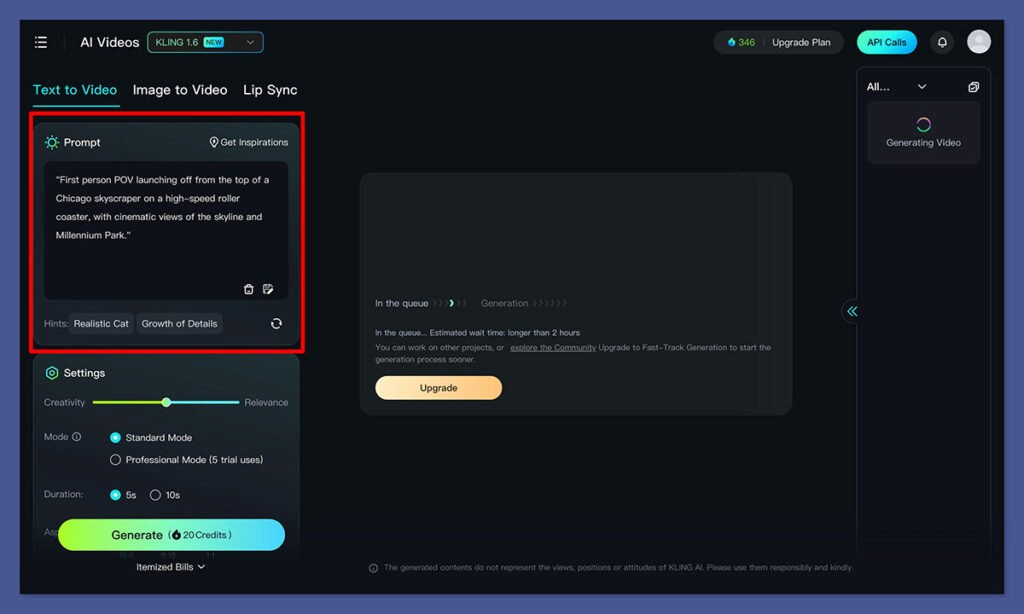
Kling's video generation panel — input your prompt on the left, adjust creativity, duration, aspect ratio, and camera motion settings, then hit Generate. Paid plan outputs arrive in 2–5 minutes.
📈 Where AI Video is Headed
Chase Jarvis summed up the trajectory after his Kling 3.0 tests: "Video models are on the same trajectory that image models were on a few years ago. We are rapidly approaching 'good enough for everything.'" If you wait for the perfect AI video tool before building a video content strategy, you'll still be waiting while your competitors are publishing. The quality threshold crossed with Kling 3.0. The window to be early is closing.
7. The Honest Verdict
Kling 3.0 produces the most consistently photorealistic AI video available to independent creators in 2026. That is not marketing language — that is the conclusion of rigorous real-world testing by one of the most credible names in professional visual media. For cinematic B-roll, product consistency, multi-shot sequences, and motion physics, Kling 3.0 is the benchmark.
And yet, the company behind it is letting its product down in ways that genuinely cost creators money. Credits expire. Support tickets go unanswered for weeks. Generations fail at 99% and take credits with them. For every creator who has a seamless experience, there's another who has lost paid credits and received no recourse.
The verdict therefore splits. For the model quality alone: 9.5 out of 10. For the business practices and support infrastructure: 5 out of 10. The blended score reflects a tool with extraordinary creative capability and genuine operational risk. Use it with eyes open. Understand the credit expiry terms. Test on the free plan before spending. And consider accessing Kling's models through third-party platforms like Artlist or Higgsfield where the terms may be more creator-friendly.
7.8
Kling AI — Exceptional Video Quality, Business Caveats Apply
Out of 10 · Reviewed June 2026
Category | Score | Notes |
|---|---|---|
Video Quality & Realism | 9.5 / 10 | Best-in-class for photorealistic footage. Fluid, weighted, natural motion. |
Feature Set (Kling 3.0) | 9.0 / 10 | Multi-shot, Elements, Kling 3 Edit — genuinely advanced capabilities. |
Consistency & Reliability | 6.5 / 10 | Output quality varies. The 99%-freeze bug and prompt-ignoring are real. |
Pricing Fairness | 6.0 / 10 | Credit expiry on paid plans is an industry outlier. Proceed cautiously. |
Customer Support | 4.0 / 10 | The biggest failure. Unanswered tickets, no refunds on failed generations. |
Value for the Right User | 8.5 / 10 | For high-volume, consistent users who can exhaust credits — genuinely worth it. |
Our recommendation: Start on the free plan (no credit card, 166 credits/month) and generate five to ten clips across different prompt styles. If the output quality consistently meets your production standard and you can realistically use 660+ credits per month, the Standard plan at $6.99/mo is one of the strongest value propositions in AI video. Verify the current credit expiry terms at kling.ai/pricing before upgrading.